Automate DMARC report processing with Telegram alerts
DMARC reports arrive as XML buried in .gz and .zip attachments. Most people ignore them. Here's how to automatically extract, parse, and get alerted when something fails.
What you'll build
A fully automated DMARC report processor that receives reports via email, decompresses and parses the XML, stores results in a data table, and sends you a Telegram summary with pass/fail details per sending source.
Why DMARC reports matter
If you've set up DMARC for your domain (you should), email providers like Google, Microsoft, and Fastmail send you regular aggregate reports. These reports tell you which servers are sending email on behalf of your domain — and whether they're passing SPF and DKIM authentication.
The problem? These reports arrive as XML files compressed inside .gz or .zip attachments. Nobody opens them. They pile up in your inbox until something goes wrong — a spoofing attempt, a misconfigured mail server, a broken DKIM key — and by then it's too late.
This flow turns those ignored attachments into actionable Telegram alerts.
How it works
DMARC report arrives
Email providers send aggregate reports to dmarc@yourdomain.com
EmailConnect receives and webhooks
Parses the email, provides a download URL for the compressed attachment
n8n downloads and decompresses
Fetches the .gz or .zip, extracts the XML using zlib — handles both formats automatically
Parses DMARC XML
Extracts report metadata, per-source-IP results, DKIM/SPF pass/fail, and policy dispositions
Stores + alerts
Records are saved to an n8n data table for history, and a formatted Telegram message is sent
What you'll need
Services
- An EmailConnect account (free tier works)
- An n8n instance (self-hosted or cloud)
- A Telegram bot (create via BotFather)
Knowledge
- A domain with DMARC configured
- Basic n8n workflow experience
- Access to your n8n server configuration (for zlib)
Step 1: Set up the DMARC email alias
Create an alias in EmailConnect for your DMARC reports — something like dmarc@in.yourdomain.com. Point it at an n8n webhook URL. Then update your domain's DMARC DNS record to send reports to this address:
Example DMARC DNS record (TXT on _dmarc.yourdomain.com)
v=DMARC1; p=quarantine; rua=mailto:dmarc@in.yourdomain.com; pct=100Email providers that support DMARC (Google, Microsoft, Yahoo, Fastmail, etc.) will now send their aggregate reports to your EmailConnect alias.
Step 2: Enable zlib in n8n
The DMARC flow needs Node.js's built-in zlib module to decompress .gz and .zip attachments. Since n8n v2, Code nodes run in a sandboxed environment that blocks access to built-in modules by default. You need to explicitly allow it.
Important: two-part configuration
If you're running n8n with an external task runner (the default for self-hosted v2), you need to configure both the main n8n container and the runner. Setting it in just one won't work.
Main n8n container (docker-compose.yml)
Add the environment variable to your n8n service:
environment:
  - NODE_FUNCTION_ALLOW_BUILTIN=crypto,zlib
n8n runner container (n8n-task-runners.json)
The runner process has its own restricted environment. Add zlib to the env-overrides in your task runners config:
{
  "env-overrides": {
    "NODE_FUNCTION_ALLOW_BUILTIN": "crypto,zlib",
    "NODE_FUNCTION_ALLOW_EXTERNAL": "moment"
  }
}
Why both?
The main n8n container validates module access before dispatching tasks. The runner actually executes the code in a sandboxed process with its own allowlist. Without the setting in both places, the runner never sees NODE_FUNCTION_ALLOW_BUILTIN — it's not in the runner's allowed-env by default, so env-overrides injects it directly.
Step 3: Build the n8n workflow
The flow is compact — just 6 nodes. The heavy lifting happens in a single Code node that handles decompression, XML parsing, and Telegram message formatting.
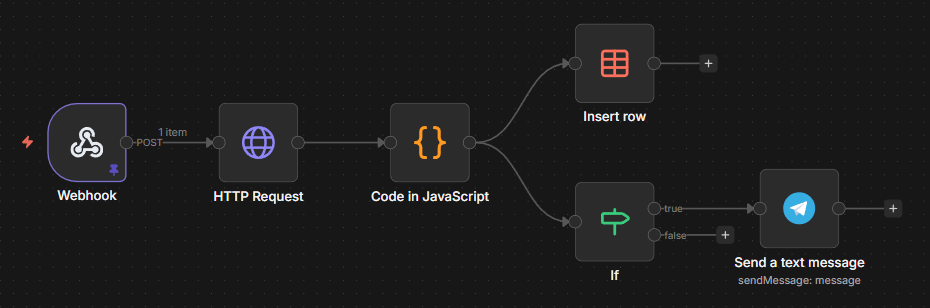
The complete n8n workflow — Webhook → Download → Parse → Store + Alert
Download the workflow
Import this JSON into your n8n instance. You'll need to add your Telegram bot credentials, set your chat ID, and optionally configure the data table.
Download n8n workflow JSONNode-by-node walkthrough
1. Webhook
Receives the POST payload from EmailConnect. The attachment download URL is at body.message.attachments[0].downloadUrl.
2. HTTP Request
Downloads the compressed attachment from the EmailConnect attachment URL. Returns binary data — could be a .gz or a .zip file depending on the sender.
3. Parse DMARC Report (Code node)
This is the core of the flow. It does several things in one node:
- Format detection — checks magic bytes to distinguish gzip vs zip vs raw XML
- Decompression — uses
zlib.gunzipSyncfor .gz, manual zip entry parsing withzlib.inflateRawSyncfor .zip - XML parsing — lightweight regex-based parser (no external dependencies needed)
- Data extraction — pulls report ID, source org, date range, and per-record details (source IP, DKIM result, SPF result, disposition)
- Telegram formatting — builds an HTML-formatted summary with pass/fail icons per source
4. Store in data table
All parsed records go into an n8n data table for historical tracking. Each row includes the report ID, source IP, message count, DKIM/SPF results, and date range. Optional — remove this node if you only want alerts.
5. Has Telegram message? (If node)
Since one DMARC report can contain multiple records, the Telegram message is only attached to the first row. This node ensures we only send one alert per report.
6. Send Telegram alert
Sends a formatted HTML message to your Telegram chat. Includes the domain, reporting org, date range, per-source pass/fail status, and a total summary.
What the Telegram alert looks like
📊 DMARC Report: yourdomain.com
📤 From: Google LLC
📅 2026-03-01 to 2026-03-02
✅ 42x from 209.85.220.41
DKIM: pass | SPF: pass
❌ 3x from 185.12.34.56
DKIM: fail | SPF: fail
📬 Total: 45 messages, ⚠️ 1 source(s) with issues
At a glance you see: which domain, who reported, how many messages, and which sources are failing. The failure with 3 messages from an unknown IP? That's either a misconfigured server or someone trying to spoof your domain. Either way, you want to know about it.
How we use it at EmailConnect
We run this exact flow on dmarc@emailconnect.eu. Every DMARC report from Google, Microsoft, Yahoo, Fastmail, and others gets automatically processed. The data table gives us a historical view of our email authentication health, and the Telegram alerts flag anything unusual immediately.
Before this flow, DMARC reports were piling up unread. Now we catch misconfigurations and spoofing attempts within hours of the report being generated.
Tips and considerations
Start with p=none
If you haven't set up DMARC yet, start with p=none to collect reports without affecting delivery. Move to p=quarantine or p=reject once you're confident all legitimate sources pass.
Multiple domains? Multiple aliases.
Set up a separate DMARC alias per domain you want to monitor. They can all point to the same n8n webhook — the flow extracts the domain from the report XML.
Report volume varies
Google sends daily reports. Some providers send weekly. Low-volume domains might only get a few reports per month. Don't worry if you don't see reports immediately.
Extend it
The data table makes it easy to build dashboards or weekly digests. You could add a weekly summary flow that aggregates pass rates across all your domains.
The attachment processing angle
This flow demonstrates something useful about EmailConnect beyond DMARC: it handles attachment-heavy emails well. The attachment download URLs are stable, authenticated, and work from any HTTP client. The same pattern works for processing invoices, extracting data from PDFs, or handling any email workflow where the attachment is the payload.
Build it yourself
Download the n8n workflow, create a free EmailConnect account, update your DMARC record, and stop ignoring your authentication reports.
Related
Questions about setting up DMARC monitoring? Reach out at hello@emailconnect.eu.